fredag, mars 31, 2006

How to Remove the Topic / Folder info in Metalink

Note, this post only applies to those who use the Oracle Support system Metalink.

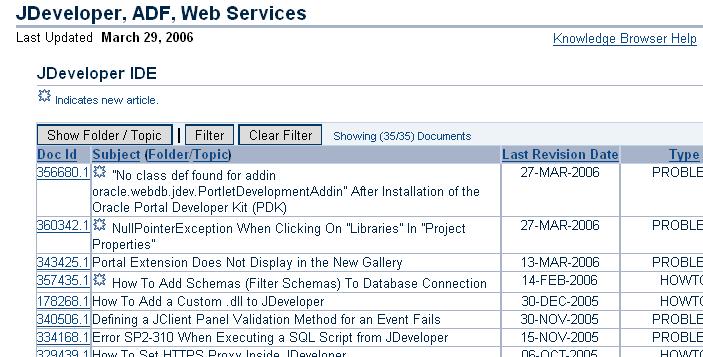
When browsing articles in Metalink, by default the Folder and Topic information is displayed in the list of articles. This can by quite annoying, but it's easy to switch off.

To do this, just click on the 'Hide Folder / Topic' button just above the articles. See the picture below:


Once switched off, the list looks much neater, in my opinion, as shown below:

torsdag, mars 30, 2006

RL Language Rules Extension for JDeveloper

I have created an extension for JDeveloper, which makes it a bit easier to work with the Oracle Business Rules Language, RL Language within JDeveloper. Read more about it on OTN at:
http://www.oracle.com/technology/products/jdev/htdocs/partners/addins/exchange/rules/howto.html

måndag, mars 27, 2006

Callout from within Oracle Business Rules

Within Oracle Business Rules you sometimes need to make callouts to an external Object within the action part of your rule. This is very easy to achieve. Suppose that you have a class with an external method similar to:

package myPackage;
public class CallOut {
public CallOut() { }

public void test(String myVariable) {
System.out.println("Callout from Rules with argument: " + myVariable);
}
}

and you would like to call upon this method from within the action part of a rule. The first thing you need to do is also to import this class into your dictionary. Once done, you need to define a new RLFunction. This function needs to have 2 variables defined, one for the class itself, and one for the argument. The argument should have the argument type String, while the class needs to have the Type CallOut, or whatever your class is named. Within the function body you then define the actual function like:

TestCallOut.test(message);

Now you have a Rules function that you cal call upon from the action part of any rule within your ruleset(s), like:

Call callOut( Passenger.name, new CallOut () )

The RL code that is generated for such a task will look like:

function callOut(String message, myPackage.CallOut TestCallOut)
{
//RL literal statement
TestCallOut.test(message);
}// DM.callOut

for the function, this will be defined in the DM ruleset. The call will look like:

rule myRule
{
priority = 0;
if
(
(
fact myPackage.SomeFactObject v0_SomeFactObject && (
(v0_SomeFactObject.anAttribute <>
)
{
DM.callOut(v0_SomeFactObject.someArgument, new myPackage.CallOut());
}
} //end rule myRule;

I hope this will have shown you how-to make a callout from Oracle Business Rules to a method within an Object.

onsdag, mars 15, 2006

JDeveloper Subversion Extension EA1 Available on OTN

Oracle is providing a Subversion Extension for JDeveloper 10.1.3. It is officially available from OTN at this URL:

http://www.oracle.com/technology/products/jdev/htdocs/partners/addins/exchange/subversion/subversion.html

To install it, just follow the provided installation instructions.

tisdag, februari 14, 2006

Installing Rule Author on a standalone OC4J 10.1.3

It is possible to install the Rule Author on a standalone OC4J 10.1.3. Below is one way of achieving this.

1. Copy the ruleauthor.ear from a AS installation on Linux, located in /rules/webapps to the windows machine, for example to d:\tmp\ruleauthor.ear

2. Startup a standalone OC4J 10.1.3 on the windows machine.

3. Deploy the Rule Author to it using:

java -jar admin.jar ormi://localhost:23791 oc4jadmin
-deploy -file D:/tmp/ruleauthor.ear -deploymentName ruleauthor

and

java -jar admin.jar ormi://localhost:23791 oc4jadmin
-bindWebApp ruleauthor ruleauthor default-web-site ruleauthor

4. Add the default user, goto http://localhost:8888/em/ and follow the steps given in the Oracle Business Rules User's Guide, section 2.1:

http://download-uk.oracle.com/docs/cd/B25221_01/web.1013/b15986/guistart.htm#sthref76

don't forget to restart the ruleautor application after defining the user.

5. Now you can use the Rule Author at the URL http://localhost:8888/ruleauthor/RuleHome.uix by using the user created in previous step.

måndag, februari 06, 2006

Combining TopLink with Oracle Business Rules

This sample will show you how you retrieve some objects by using TopLink and then use Oracle Business Rules to do some selection upon these objects. I am not using neither a file based nor a WebDAV based rule repository for this sample, instead I create the ruleset on the fly.

Suppose you have a table, PERSON, that has the following structure:

PERSON
------
PID NUMBER
NAME VARCHAR2(32)
SEX CHAR(1)
EYECOLOR VARCHAR2(8)
INCOME NUMBER

and this is mapped to a Person object which has corresponding fields and accessors. I will also assume that you have setup a TopLink mapping between the table and the object.


Now, we first need to retrieve the objects from the DB, assuming we are working with a 2-tier here, we do this as follows:

SessionManager sessionManager = SessionManager.getManager();
Session session = sessionManager.getSession("default");
Vector v = session.readAllObjects(Person.class);


This will read all persons in the database and put them into a Vector. Now, we have a vector, v, that holds our persons. The next step is to initiate the RuleSession, as mentioned before, this is done on the fly with one simple rule:

RuleSession rs = new RuleSession();
String rset =
"ruleset main {" +
" import ruleexample1.bo.Person;" +
" rule blueEyeFemaleWithIncomeOver40000 {" +
" if (fact Person p && p.getEye_color().equals(\"Blue\") && p.getSex().equals(\"F\") && p.getIncome()>40000 ) {" +
" println(p.getName() + \" is a female with blue eyes and an income over 400000.\");" +
" }" +
" }" +
"}";
rs.executeRuleset(rset);

this rule will fire for females with blue eyes and has an income over 40000. Once done, we can assign the persons as facts, this is done by:

for (int i=0;i<v.size();i++) {
rs.callFunctionWithArgument( "assert", (Person)v.elementAt(i) );
}

once the facts are in place, we can run this by calling:

rs.callFunction( "run" );

That's it! This will print out a list of objects that matches the conditions set out in the rule set.

fredag, februari 03, 2006

Functions in Oracle Business Rules RL Language

The Oracle Business Rules RL Language syntax is very similar to Java, so it should be very easy for a Java programmer to get a grasp on the syntax quickly. If you have a background working with Jess, you will however notice that the syntax differs a bit. I will give a quick demonstration on the differences concerning functions.

In Jess you create a function like:

Jess> (deffunction max (?x ?y)
(if (> ?x ?y) then
(return ?x)
else
(return ?y)))

and you call upon it with the following statement:

Jess> (printout t "The biggest number of 5 and 7 is: " (max 5 7) "." crlf)

In RL Language you create a similar function like:

RL> function max(long x, long y) returns long {
if (x<=y) { return y; }
else { return x; }
}

and you call upon it with the following statement:

RL> println("The biggest number of 5 and 7 is: " + max(5,7) + ".");

So, as you can see, with respect to functions, Jess and RL Language looks quite the same, however, there are syntactical differences for the programmer to be aware of.

torsdag, februari 02, 2006

Oracle Business Rules not Installed by Default

I downloaded and installed the Oracle AS 10.1.3 today in order to get going with the Oracle Business Rules. As indicated on the OTN page it says that this should be included with the installation. It is included, but the Rule Author it is not installed by default.

So, once you have installed the Oracle AS 10.1.3, you also need to deploy the ruleauthor.ear file to the OC4J instance where you want your Rule Author to run. The file is located in the /rules/webapps directory.

Once deployed, the Rule Author came up nicely.

Started Blog

Started this blog on the 2nd of February 2006.