onsdag, september 05, 2007

Oracle Lite, JDeveloper and Invalid Oracle URL specifiedError Code 17067

Oracle Lite and me have never been friends, but I think that I now have finally beaten the ghost. The background is that I simply wanted to use the OLite in order to do some testing, instead of having run to run a full DB, I wanted to use OLite. So far so good.

I started to configure a DB connection in JDeveloper towards the OLite, and this part went smooth and without problem. Next, I created a small project in JDeveloper based on TopLink and session facade beans. This went fine as well, JDeveloper nicely created my POJO's based on the tables. Finally I created a JSF page to display the data. All in all, the design process went smooth as silk.

The problems started when running the project on the embedded OC4J. All I got was a little error saying:

Internal Exception: java.sql.SQLException: Invalid Oracle URL specifiedError Code: 17067

I performed a few searches on this, but could not really find any useful information, so it was time to start to dig. My first thought was that this was a class loading issue, and that the error was not really the real error; so I added the olite40.jar to about all places that would be relevant for my JDeveloper installation. It did not help; I still ended up with the same error.

Next thought, perhaps the error message was a bit relevant after all, so I added a data-sources.xml file to my project (and an orion-application.xml) to get better control of the data sources. Further, I added a new data source based on the predefined OLite connection and told the session.xml file to use this connection. I did not yet make any further modifications, the new data source was correctly picked up, but I ended up with the same error.

Here was what the original data source looked like:

<connection-pool name="jdev-connection-pool-LocalSoaSuiteOLitee">
<connection-factory factory-class="oracle.jdbc.pool.OracleDataSource"
user="username" password="password" url="jdbc:polite4@localhost:1531:orabpel"/>
</connection-pool>
<managed-data-source name="jdev-connection-managed-LocalSoaSuiteOLitee"
jndi-name="jdbc/LocalSoaSuiteOLiteeDS" connection-pool-name="jdev-connection-pool-LocalSoaSuiteOLitee"/>

I noticed the small piece: factory-class="oracle.jdbc.pool.OracleDataSource", this looked a bit strange to me, so I tested to change this into: factory-class="oracle.lite.poljdbc.POLJDBCDriver" instead, like:

<connection-pool name="jdev-connection-pool-LocalSoaSuiteOLitee">
<connection-factory factory-class="oracle.lite.poljdbc.POLJDBCDriver"
user="username" password="password" url="jdbc:polite4@localhost:1531:orabpel"/>
</connection-pool>
<managed-data-source name="jdev-connection-managed-LocalSoaSuiteOLitee"
jndi-name="jdbc/LocalSoaSuiteOLiteeDS" connection-pool-name="jdev-connection-pool-LocalSoaSuiteOLitee"/>

Once I restarted the project, it all went fine. So, why this did happen after all? Well, it looks as JDeveloper treats an OLite connection as an Oracle connection, so when it generates the data-sources.xml file for the embedded OC4J instance is sets the factory class to what it would be for an Oracle database. With this mind, I can summarize what I did into these steps:
  1. Add a data-sources.xml file and an orion-application.xml file to the project.
  2. Create a new data source.
  3. Change the factory-class to oracle.lite.poljdbc.POLJDBCDriver.

tisdag, september 04, 2007

A Small Comment on MySQL in JDeveloper 11 (Preview Release)

Today I've been doing some tests using MySQL together with the JDeveloper 11 Preview Release. This worked fine, most of the info is covered in the Help chapter, "Working with Non-Oracle Database". However, I missed out one small piece; how to get it to work together with the Embedded OC4J, or rather, where to put the MySQL JDBC JAR file? This as I got an

"Exception: oracle.oc4j.sql.config.DataSourceConfigException: Unable to create : com.mysql.jdbc.Driver"

when trying to run my application.

As of JDeveloper 11, a new default directory structure for user-specific content in JDeveloper for Windows is used. The default location for the system subdirectory is now %APPDATA%\JDeveloper\systemXX.XX.XX.XX, where:

  • %APPDATA% is the Windows Application Data directory for the user (usually C:\Documents and Settings\<username>\Application Data)
  • XX.XX.XX.XX is a unique number of the product build, for example, system11.1.1.0.17.45.02

So, in my case, the MySQL JDBC JAR file (mysql-connector-java-3.1.12-bin.jar) should go into the directory:

C:\Documents and Settings\
<username>\Application Data\JDeveloper\system11.1.1.0.17.45.24\o.j2ee\embedded-oc4j\applib

Once I put it there, and restarted the embedded OC4J, it worked fine.

måndag, september 03, 2007

Combining Information

It exists countless articles & blog entries about ADF, however, I have found that quite often do they not exactly cover the exact topic that I am looking for, but, if I combine a few of them they can often together build a solution that is useful for me.

For example, in most cases when you want to display a certain record, the easiest approach if to use a ViewObject with a bind variable and then use the executeWithParams approach, as described in Duncan's blog here:

http://groundside.com/blog/DuncanMills.php?title=executewithparams_my_new_best_buddy&more=1&c=1&tb=1&pb=1

Last week I was assisting one of our partners in a project, and they wanted to display a certain record, but they did not want to use this approach. Instead they wanted to set the selected record based on a parameter sent to the page, and set the record is something like an 'onLoad' event for the page. So, what we did here was to use the processScope variable as described in this article to send the parameter:

http://www.oracle.com/technology/products/jdev/htdocs/partners/addins/exchange/jsf/doc/devguide/communicatingBetweenPages.html

and then combining this with an ADF Page Phase Listener as described here to set the record:

http://groundside.com/blog/DuncanMills.php?title=adf_executing_code_on_page_load&more=1&c=1&tb=1&pb=1

The PagePhaseListener is implemented in the backing bean and this then uses the setCurrentRowWithKeyValue to set the correct row in the iterator, something like:

if (event.getPhaseId() == Lifecycle.PREPARE_MODEL_ID) {
AdfFacesContext afContext = AdfFacesContext.getCurrentInstance();
String myValue = (String)afContext.getProcessScope().get("myKey");
FacesPageLifecycleContext ctx = (FacesPageLifecycleContext)event.getLifecycleContext();
DCIteratorBinding iter = ((DCBindingContainer)ctx.getBindingContainer()).findIteratorBinding("
DepartmentsView1Iterator");
iter.setCurrentRowWithKeyValue(myValue);
}

So, all-in-all, by combining 2 useful articles, I were able to solve the problem, even if no single article covered the problem.

måndag, augusti 20, 2007

New Semester, New Job

It's been a bit quiet here from the last weeks, but now I'm back from my holiday where I spent most of the time moving (and some renovation...) out from the city into a house on the country side about 50 kilometres south of Gothenburg. I am also starting a new job. I am joining Oracle's PTS group here in EMEA. Platform Technology Solutions, PTS, is part of Oracle's Server Technologies Product Development Division, and provides the shortest link between our Partners and key Customers and Oracle R&D. PTS ensures that members of the Oracle Partner Network are proficient in Oracle technology. That's the high level definition; exactly what my role will be in this mission will be carved out during the next few weeks. With this change in mind, I guess what I will be writing about here will also be changed a little, but I won't dwell about this now, instead, time will tell.

fredag, juni 29, 2007

JDeveloper 10.1.3.3 Released

JDeveloper 10.1.3.3 build 4157 has now been released to OTN for download:

http://www.oracle.com/technology/software/products/jdev/htdocs/soft10133.html

A list of the bugs fixed in this release can be found at:

http://www.oracle.com/technology/products/jdev/htdocs/10.1.3.3/fixlist.htm

tisdag, juni 26, 2007

Altering the Show/Hide Text of a "detailStamp" Facet

Another question that is related to the one that I answered in my previous post is how you can alter the Show/Hide text in the <f:facet name="detailStamp">. The answer to this one is to use the <af:showDetail id="showDetail1"> component instead and set the attributes disclosedText and undisclosedText.

If you drag and drop a Master table with in-line details in a JSF page with JDeveloper, it will generate code like:


<f:facet name="detailStamp">
<af:table rows="#{bindings.DeptView1.rangeSize}"
emptyText="No rows yet." var="detailRow"
value="#{row.children}">
<af:column headerText="#{row.children[0].labels.Ename}"
sortable="false" sortProperty="Ename">
<af:outputText value="#{detailRow.Ename}"/>
</af:column>
<af:column headerText="#{row.children[0].labels.Job}"
sortable="false" sortProperty="Job">
<af:outputText value="#{detailRow.Job}"/>
</af:column>
</af:table>
</f:facet>


for the in-line table. Here you cannot change the generated Show/Hide text that ADF generates. See the image below (in Swedish):
If you want to modify these, to something like:


you need to use some code along the line of:

<af:column headerText="Test" sortable="false">
<af:showDetail id="showDetail1" disclosedText="Brown" undisclosedText="Charlie">
<af:table rows="#{bindings.DeptView1.rangeSize}"
emptyText="No rows yet." var="detailRow"
value="#{row.children}">
<af:column headerText="#{row.children[0].labels.Ename}"
sortable="false" sortProperty="Ename">
<af:outputText value="#{detailRow.Ename}"/>
</af:column>
<af:column headerText="#{row.children[0].labels.Job}"
sortable="false" sortProperty="Job">
<af:outputText value="#{detailRow.Job}"/>
</af:column>
</af:table>
</af:showDetail>
</af:column>

If you do not want to have any text at all, just set the attributes disclosedText="" and undisclosedText="".

torsdag, juni 21, 2007

Hiding the Header for the Selection Facet

A question that I have seen on a few occasions is how you can hide the "Select" heading in the table when using the selection facet. Here is a solution for that problem that is based on this entry: http://www.orablogs.com/fnimphius/archives/001973.html in Frank Nimphius blog. Please note that, as Frank writes, that "Note that the CSS uses translateable text (or here translateable component names) to identify the component, which makes this solution weak.".

You can hide the 'Select' text by setting the text size to 0 for the concerned table header style (using display:none will not work, as it will cause the table headers to display over the incorrect column).

Here is the Table as default:


The "Select" (or in Swedish "Välj") header is controlled by this style (th.x2z) element (see page source):

<th scope="col" width="1%" nowrap class="x2z">Välj</th>

Now you can alter the af:tableSelectMany by changing the code in the page to:

<f:facet name="selection">

<af:tableSelectMany text="Test">

<f:verbatim>

<style type="text/css">

th.x2z{font-size: 0};

</style>

</f:verbatim>

</af:tableSelectMany>

</f:facet>


This will result in the following table:


Now the "Select" (or "Välj") test is set to 0 size, thus will not be displayed.

torsdag, juni 14, 2007

Running a JAR File that Includes Another JAR From the Command Prompt

Today I got a question from a colleague on how-to run a JAR file that includes another JAR file directly from the command prompt, he couldn't get this to work - it just ended up with java.lang.NoClassDefFoundError exception. At first glance this seemed quite trivial, but it turned out to be more complicated than I first thought. My initial attempts also resulted in java.lang.NoClassDefFoundError, so I started to search around a bit for further information about the topic. This led me to this site http://one-jar.sourceforge.net/, and (as always) it turned out that someone else already solved the problem.


As I use JDeveloper (of course...) it needs to be added a few steps in addition to using one-jar to get the whole process to work, this is documented below.


1. First I created a new Workspace in JDeveloper with 2 projects 'mainproject' and 'subproject'.


2. In the 'subproject' there is a single dummy that have one method that just writes something to the System.out. There is also a JAR deployment profile that includes the mentioned class. The target JAR file I just called sub.jar.


3. Now it's time to create the 'mainproject'. As I am using the One-JAR in the end there are 2 restrictions I need to take into account for this project:

a. The main class needs to be named 'Main'
b. The target JAR file needs to be called 'main.jar'

I created a new class called 'Main' in the 'mainproject', added a dependency in the Project Properties to 'subproject' and created a dummy method in this class that uses the class created under 2. I ran the Main class inside JDeveloper to ensure that it worked before proceeding.

After that I created a JAR deployment profile. I made sure to name the target JAR file to 'main.jar'. Also checked the 'Include Manifest File (META-INF/MANIFEST.MF)' box and pointed the 'Main Class' to my 'Main' class. Next I made sure NOT to include my classes from the 'subproject' into this JAR file. This as they will be provided in a separate JAR file.


4. Next, it was time to download and install One-JAR. One-JAR can be downloaded from http://sourceforge.net/projects/one-jar. I created a new empty folder on my file system and placed the one-jar-boot-0.95.jar file there and renamed this to one-jar.jar. In my newly created folder I also added 2 subfolders 'main' and 'lib'. Once done I deployed my 2 JAR filed from JDeveloper, main.jar and sub.jar and placed them in the respective folders (main.jar in main and sub.jar in lib). The archive now has a structure similar to what is shown below:


5. Now it's time to test this, and if it works correctly then the result should look something like:

D:\home\Demos\OneJARDemo\deploy>java -jar one-jar.jar
Hello from Main
Hello from sub project!

måndag, juni 04, 2007

About Rules and Execution Order

A question that pops-up from time to time is about Rules and execution order, i.e., is there a way to control the execution order of rules? There are technically two ways of doing this. The first way of obtaining this is by using rule priorities, the second is to use the ruleset stack.

However, I believe that using rule priorities in general should really be avoided, and is usually discouraged for two reasons; first, if will impact performance negative with respect to the built-in conflict resolution strategies. Secondly, it is considered bad style to use priorities in rule based programming to try to force a specific order. If you find yourself using priorities for most of your rules, then you should consider if using a rule based approach is really the best solution for your problem. If you want strict control over execution order, then you are really using procedural programming and not rule based programming.

If you still want to execution order, you should use the ruleset stack. This will be a more flexible solution than using a single ruleset and using rule priorities. How to do this is described in the Oracle Business Rules Language Reference, section 1.4.3 'Ordering Rule Firing'.

onsdag, maj 30, 2007

ADF Faces Multi Select Table using JDeveloper 11g Technology Preview

About a year ago Frank Nimphius wrote this post (http://www.orablogs.com/fnimphius/archives/001778.html) about multi-selection in ADF Faces tables. I tried out this approach recently using the JDeveloper 11g Technology Preview release and found that things have changed slightly since then. The purpose here is not to fully describe this feature, for that please see Frank's post, but to point to the changes between 10.1.3 and the 11g Preview version.

These are the main changes in short:
  • No need to create the selectMany component any longer.
  • A Slightly different way to iterate through the rows is needed.

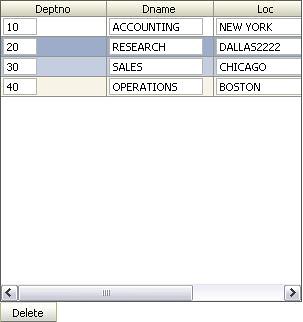
Once you have created the table using 11g, you will notice that it looks slightly different:


As mentioned before, you no longer needs to use a 'tableSelectMany' component to get multi-selections for the table, instead you define the 'rowSelection' and 'binding' attributes directly on the 'table' element, like:

<af:table value="#{bindings.DeptView1.collectionModel}" var="row"
rows="#{bindings.DeptView1.rangeSize}"
first="#{bindings.DeptView1.rangeStart}"
emptyText="#{bindings.DeptView1.viewable ? 'No rows yet.' : 'Access Denied.'}"
fetchSize="#{bindings.DeptView1.rangeSize}"
rowSelection="multiple" id="table1"
selectionListener="#{api.table1_selectionListener}"
binding="#{api.myTable}"
>

Next, you need to map the managed bean to use the RichTable class, like:

<managed-property>
<property-name>myTable</property-name>
<property-class>oracle.adf.view.rich.component.rich.data.RichTable</property-class>
<value>#{table1}</value>
</managed-property>


and, also to use this class also in the backing bean:

private RichTable _table;

public RichTable getMyTable() {
return _table;
}

public void setMyTable(RichTable table) {
this._table = table;
}


As mentioned before, the way to iterate through the rows have also changed a bit. In 10.1.3 you could use:

Key _key = (Key) keyIter.next();

directly, in 11g I noticed that you have to use this approach instead:

List l = (List)rowSetIter.next();
Key key = (Key)l.get(0);

Also, you use the 'getSelectedRowKeys()' method instead of 'getSelectionState().getKeySet()'. The full code will look something like:

RichTable table = this.getMyTable();
RowKeySet rowSet = table.getSelectedRowKeys();
Iterator rowSetIter = rowSet.iterator();
DCBindingContainer bindings = this.getBindingContainer();
DCIteratorBinding iter = bindings.findIteratorBinding("DeptView1Iterator");

while (rowSetIter.hasNext()) {
List l = (List)rowSetIter.next();
Key key = (Key)l.get(0);
iter.setCurrentRowWithKey(key.toStringFormat(true));
Row r = iter.getCurrentRow();
System.out.println("selected dept " + r.getAttribute("Dname"));
}


Finally, with these changes in mind, the result of the above should end up in an output similar to:

07/05/30 13:36:33 selected dept SALES
07/05/30 13:36:33 selected dept RESEARCH


I hope this have illustrated the changes between the 10.1.3 and the 11g Preview Release for the multi-selection table.