onsdag, juli 05, 2006

Incremental Deployment using JDeveloper & OC4J

In the JDeveloper online help and in the OC4J Deployment Guide 10.1.3, the option to use virtual directories is mentioned. This feature can be used to implement incremental deployment using JDeveloper & OC4J.

Here is how it works:
The element 'virtual-directory' adds a virtual directory mapping for static content. This is conceptually similar to symbolic links on a UNIX system. The virtual directory enables you to make files in the "real" document root directory available to the application, even though the files do not physically reside in the Web application WAR file.


Here is an example:

1. Start JDeveloper & a standalone OC4J Server (10.1.3 versions).
2. Create a new Workspace in JDeveloper, with 2 empty projects.
3. In Project 1, create a new HTML page.
4. Create a new WAR deployment profile for Project 1, set the J2EE Context to 'foo'.
5. Deploy the application to the standalone OC4J server.
6. Ensure that you can access the HTML file from a browser.
7. In Project 2, create a new JSP file.
8. Add the deployment descriptor orion-web.xml to Project 2. Add this line to that file:

<virtual-directory virtual-path="/foo" real-path="D:\oracle\oc4j1013\j2ee\home\applications\webapp1\webapp1" />

You need, of course, to alter the real-path to where your first application has been deployed. You could also have placed the files directly somewhere on the server, and referenced this directory here instead of creating a Project and deploying them.

9. Create a new WAR deployment profile in Project 2, set the J2EE Context to 'fuu'.
10. Deploy the application to the standalone OC4J server.
11. Ensure that you can access the JSP file from a browser.
12. Now you will be able to access the HTML file by using:

http://localhost:8888/fuu/foo/untitled1.html

13. Alter the JSP in Project 2 and re-deploy Project 2. Notice that you can still access the HTML file from the above URL without having to re-deploy also these files.

onsdag, juni 28, 2006

JDeveloper 10.1.3 SU4 Available

The Service Update 4 (SU4) for JDeveloper 10.1.3 is available. Use 'Help' -> 'Check for Updates' from within JDeveloper to download and install it.

onsdag, maj 31, 2006

Configuring a 2:nd OC4J Instance for ADF use within an Oracle Application Server

When you setup a second OC4J instance within an Oracle Application Server 10.1.3 it won't have the ADF Libraries configured, this means that if you deploy an ADF application to this instance, it won't work. Further, there is no option neither within JDeveloper nor with the ADF Installer to configure this second instance for use with ADF, so what to do in this situation? Answer: You'll just have to do some manual configuration.

Assuming that you have created the 2:nd OC4J instance by using the createInstance command, you then need to update the files server.xml and application.xml for this instance with some additional configuration before starting it.

Both of these files are located in the directory:

<ORCALE_AS_HOME>/j2ee/<INSTANCE_NAME>/config

Open them with your favourite editor.

Add the following entries:

server.xml
==========

<shared-library name="oracle.expression-evaluator" version="10.1.3" library-compatible="true">
<code-source path="../../../jlib/commons-el.jar"/>
<code-source path="../../../jlib/oracle-el.jar"/>
<code-source path="../../../jlib/jsp-el-api.jar"/>
</shared-library>

<shared-library name="adf.oracle.domain" version="10.1.3" library-compatible="true">
<code-source path="../../../BC4J/lib"/>
<code-source path="../../../jlib/commons-cli-1.0.jar"/>
<code-source path="../../../mds/lib/concurrent.jar"/>
<code-source path="../../../mds/lib/mdsrt.jar"/>
<code-source path="../../../jlib/xmlef.jar"/>
<code-source path="../../../jlib/commons-el.jar"/>
<code-source path="../../../jlib/oracle-el.jar"/>
<code-source path="../../../jlib/jsp-el-api.jar"/>
<code-source path="../../../BC4J/jlib/adfmtl.jar"/>
<code-source path="../../../BC4J/jlib/adfui.jar"/>
<code-source path="../../../BC4J/jlib/jdev-cm.jar"/>
<code-source path="../../../BC4J/jlib/adf-connections.jar"/>
<code-source path="../../../BC4J/jlib/dc-adapters.jar"/>
<code-source path="../../../ord/jlib/ordim.jar"/>
<code-source path="../../../ord/jlib/ordhttp.jar"/>
<code-source path="../../../jlib/ojmisc.jar"/>
<code-source path="../../../lib/xsqlserializers.jar"/>
<import-shared-library name="oracle.xml"/>
<import-shared-library name="oracle.jdbc"/>
<import-shared-library name="oracle.cache"/>
<import-shared-library name="oracle.dms"/>
<import-shared-library name="oracle.toplink"/>
<import-shared-library name="oracle.sqlj"/>
<import-shared-library name="oracle.ws.core"/>
<import-shared-library name="oracle.ws.client"/>
<import-shared-library name="oracle.xml.security"/>
<import-shared-library name="oracle.ws.security"/>
<import-shared-library name="oracle.ws.reliability"/>
<import-shared-library name="oracle.jwsdl"/>
<import-shared-library name="oracle.http.client"/>
</shared-library>

<shared-library name="adf.generic.domain" version="10.1.3" library-compatible="true">
<code-source path="../../../BC4J/jlib/bc4jdomgnrc.jar"/>
<code-source path="../../../BC4J/lib"/>
<code-source path="../../../jlib/commons-cli-1.0.jar"/>
<code-source path="../../../mds/lib/concurrent.jar"/>
<code-source path="../../../mds/lib/mdsrt.jar"/>
<code-source path="../../../jlib/xmlef.jar"/>
<code-source path="../../../jlib/commons-el.jar"/>
<code-source path="../../../jlib/oracle-el.jar"/>
<code-source path="../../../jlib/jsp-el-api.jar"/>
<code-source path="../../../BC4J/jlib/adfmtl.jar"/>
<code-source path="../../../BC4J/jlib/adfui.jar"/>
<code-source path="../../../BC4J/jlib/jdev-cm.jar"/>
<code-source path="../../../BC4J/jlib/adf-connections.jar"/>
<code-source path="../../../BC4J/jlib/dc-adapters.jar"/>
<code-source path="../../../ord/jlib/ordim.jar"/>
<code-source path="../../../ord/jlib/ordhttp.jar"/>
<code-source path="../../../jlib/ojmisc.jar"/>
<code-source path="../../../lib/xsqlserializers.jar"/>
<import-shared-library name="oracle.xml"/>
<import-shared-library name="oracle.jdbc"/>
<import-shared-library name="oracle.cache"/>
<import-shared-library name="oracle.dms"/>
<import-shared-library name="oracle.toplink"/>
<import-shared-library name="oracle.sqlj"/>
<import-shared-library name="oracle.ws.core"/>
<import-shared-library name="oracle.ws.client"/>
<import-shared-library name="oracle.xml.security"/>
<import-shared-library name="oracle.ws.security"/>
<import-shared-library name="oracle.ws.reliability"/>
<import-shared-library name="oracle.jwsdl"/>
<import-shared-library name="oracle.http.client"/>
</shared-library>

<application name="bc4j" path="../../../BC4J/redist/bc4j.ear" start="true" />

application.xml
===============

<imported-shared-libraries>
<import-shared-library name="adf.oracle.domain"/>
</imported-shared-libraries>

Please also verify that the file jdev-cm.jar exists in the location pointed by the line:

<code-source path="../../../BC4J/jlib/jdev-cm.jar"/>

If this file does not exists there, just copy it from your JDeveloper installation to this location.

When you now start the 2:nd instance you will be able to deploy ADF applications also to this instance.

JDeveloper Release 9.0.4.3 Out

The 9.0.4.3 maintenance release is now out. For information of bugs fixed in this release, please refer to:

http://www.oracle.com/technology/products/jdev/htdocs/904/9043_fix_list.html

It can be downloaded from OTN at the URL:

http://www.oracle.com/technology/software/htdocs/jdevlic.html?http://otn.oracle.com/software/products/jdev/htdocs/soft9043.html


For reference, here is the current list of the latest releases of the JDeveloper versions:

9.0.4.3
9.0.5.2
10.1.2.1
10.1.3 SU3

torsdag, april 06, 2006

Recursion in RL Functions

Today I was thinking if it were possible to create recursive functions in the RL Language, so I made a small test by calculating factorials. I started by defining the function as:

function factorial(long x) returns long {
if( x == 1) {
return 1;
} else {
return x*(factorial( x-1 ));
}
}

Next, I just ran it by using:

println("The factorial of 12 is: " + factorial(12) + ".");

and this gave me the expected result of:

The factorial of 12 is: 479001600.

so, this seems to work fine.

Next thing will be to try recursion for facts, and of course for rules... More about that later.

måndag, april 03, 2006

Site Feeds

Added links to Atom and RSS feed links in the Links section. They are also available here:

Atom Site Feed
RSS Site Feed

fredag, mars 31, 2006

How to Remove the Topic / Folder info in Metalink

Note, this post only applies to those who use the Oracle Support system Metalink.

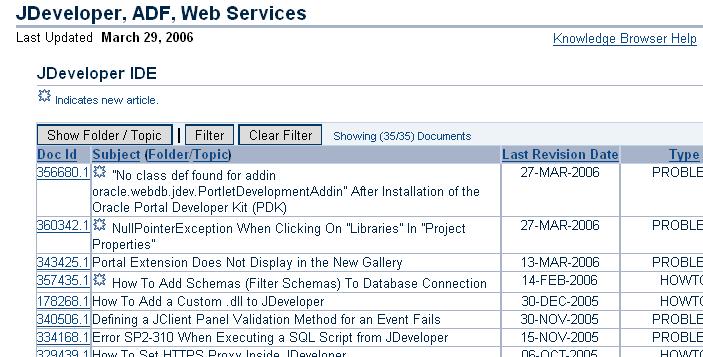
When browsing articles in Metalink, by default the Folder and Topic information is displayed in the list of articles. This can by quite annoying, but it's easy to switch off.

To do this, just click on the 'Hide Folder / Topic' button just above the articles. See the picture below:


Once switched off, the list looks much neater, in my opinion, as shown below:

torsdag, mars 30, 2006

RL Language Rules Extension for JDeveloper

I have created an extension for JDeveloper, which makes it a bit easier to work with the Oracle Business Rules Language, RL Language within JDeveloper. Read more about it on OTN at:
http://www.oracle.com/technology/products/jdev/htdocs/partners/addins/exchange/rules/howto.html

måndag, mars 27, 2006

Callout from within Oracle Business Rules

Within Oracle Business Rules you sometimes need to make callouts to an external Object within the action part of your rule. This is very easy to achieve. Suppose that you have a class with an external method similar to:

package myPackage;
public class CallOut {
public CallOut() { }

public void test(String myVariable) {
System.out.println("Callout from Rules with argument: " + myVariable);
}
}

and you would like to call upon this method from within the action part of a rule. The first thing you need to do is also to import this class into your dictionary. Once done, you need to define a new RLFunction. This function needs to have 2 variables defined, one for the class itself, and one for the argument. The argument should have the argument type String, while the class needs to have the Type CallOut, or whatever your class is named. Within the function body you then define the actual function like:

TestCallOut.test(message);

Now you have a Rules function that you cal call upon from the action part of any rule within your ruleset(s), like:

Call callOut( Passenger.name, new CallOut () )

The RL code that is generated for such a task will look like:

function callOut(String message, myPackage.CallOut TestCallOut)
{
//RL literal statement
TestCallOut.test(message);
}// DM.callOut

for the function, this will be defined in the DM ruleset. The call will look like:

rule myRule
{
priority = 0;
if
(
(
fact myPackage.SomeFactObject v0_SomeFactObject && (
(v0_SomeFactObject.anAttribute <>
)
{
DM.callOut(v0_SomeFactObject.someArgument, new myPackage.CallOut());
}
} //end rule myRule;

I hope this will have shown you how-to make a callout from Oracle Business Rules to a method within an Object.

onsdag, mars 15, 2006

JDeveloper Subversion Extension EA1 Available on OTN

Oracle is providing a Subversion Extension for JDeveloper 10.1.3. It is officially available from OTN at this URL:

http://www.oracle.com/technology/products/jdev/htdocs/partners/addins/exchange/subversion/subversion.html

To install it, just follow the provided installation instructions.